实验Malware Analysis
繁琐的环境配置,但经受过CTF-web环境配置的苦之后,这些都不!算!什!么!!
文中的代码可能会有奇奇怪怪的符号或格式,因为实验报告需要word格式,这些是我复制过来的,实在懒得一一检查了。。。
一.实验目的
掌握Malware Analysis的方法。
二.实验内容
(一)静态分析
1. 样本准备:样本1
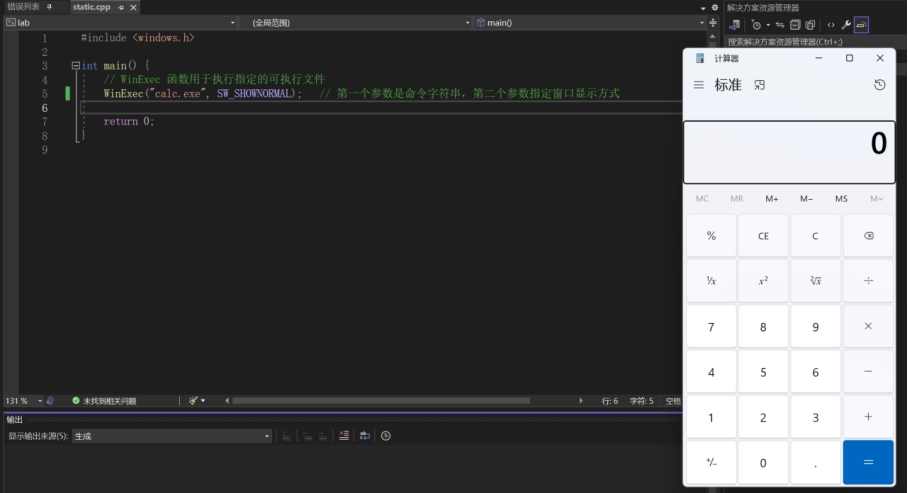
请用C++或C语言编写一个可执行程序static.exe,该程序使用Windows API “WinExec”启动本地Windows操作系统的计算器程序”calc.exe”
1
2
3
4
5
6
7
8
9
10
11
| #include <windows.h>
int main() {
WinExec("calc.exe", SW_SHOWNORMAL);
return 0;
}
|

2. 人工分析
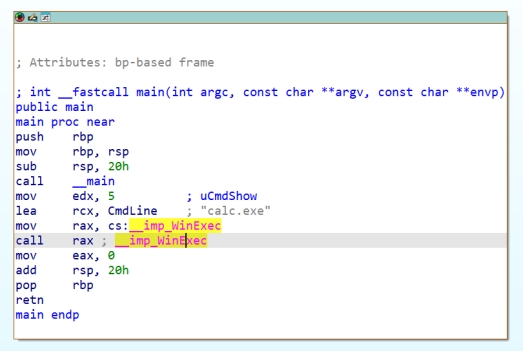
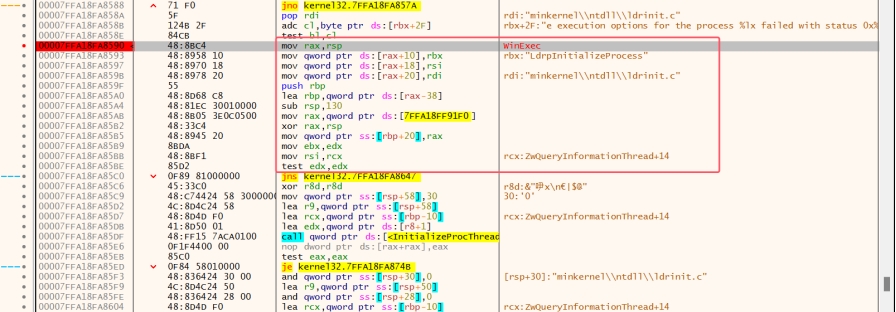
请使用反汇编工具IDA人工分析样本1,定位到“WinExec”。
汇编代码:
3. 自动化分析
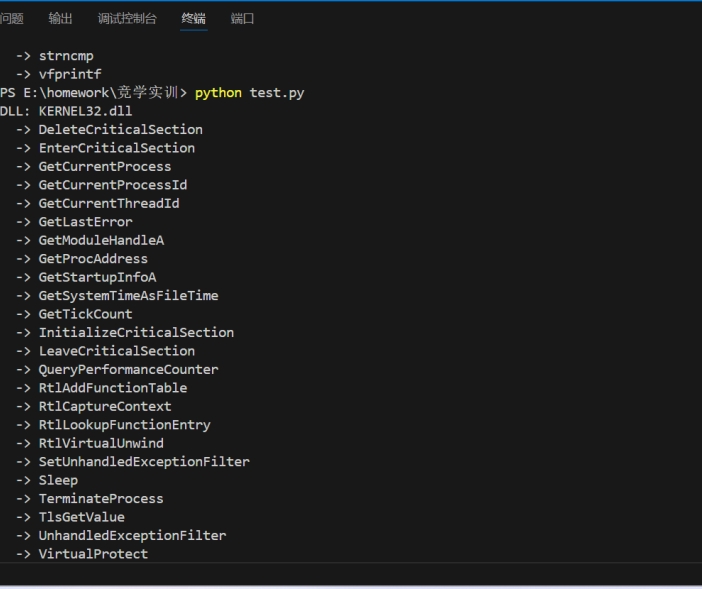
参考资料或者自己查找资料,使用python库 pefile自动化分析样本1的导入函数。
安装pefile库,代码及运行结果如下:
1
2
3
4
5
6
7
8
9
10
11
12
13
14
15
16
17
18
19
20
21
22
23
24
25
26
27
28
29
30
| import pefile
import sys
def analyze(file_path):
# 加载PE文件
pe = pefile.PE(file_path)
# 遍历导入表中的每个DLL及其导入函数
for entry in pe.DIRECTORY_ENTRY_IMPORT:
dll_name = entry.dll.decode('utf-8')
print(f"DLL: {dll_name}")
for imp in entry.imports:
func_name = imp.name.decode('utf-8') if imp.name else f"Ordinal_{imp.ordinal}"
print(f" -> {func_name}")
pe_file_path = "static.exe"
analyze(pe_file_path)
|
(二)动态分析
1. 样本准备:样本2
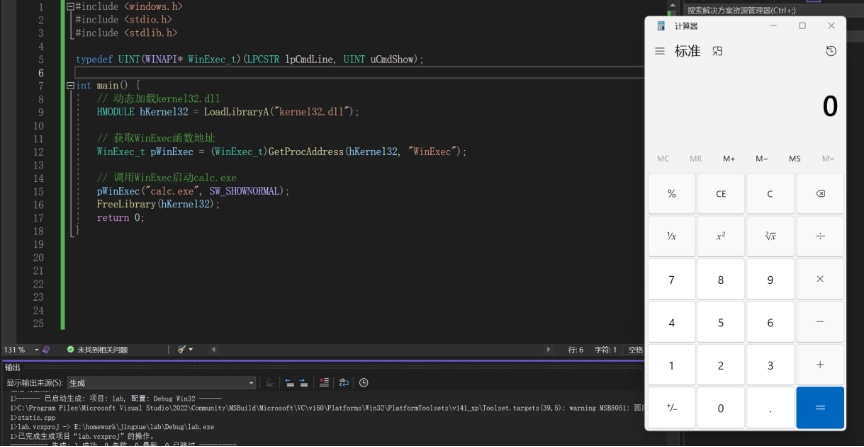
请用C++或C语言编写一个可执行程序dynamic.exe,该程序先使用Windows API“LoadlibraryA”, “GetProcessAddress”动态加载“WinExec”,然后启动程序“calc.exe”
1
2
3
4
5
6
7
8
9
10
11
12
13
14
15
16
17
18
19
20
21
22
23
24
25
26
27
28
29
| #include <windows.h>
#include <stdio.h>
#include <stdlib.h>
typedef UINT (WINAPI *WinExec_t)(LPCSTR lpCmdLine, UINT uCmdShow);
int main() {
HMODULE hKernel32 = LoadLibraryA("kernel32.dll");
WinExec_t pWinExec = (WinExec_t)GetProcAddress(hKernel32, "WinExec");
pWinExec("calc.exe", SW_SHOWNORMAL);
FreeLibrary(hKernel32);
return 0;
}
|
2. 人工分析
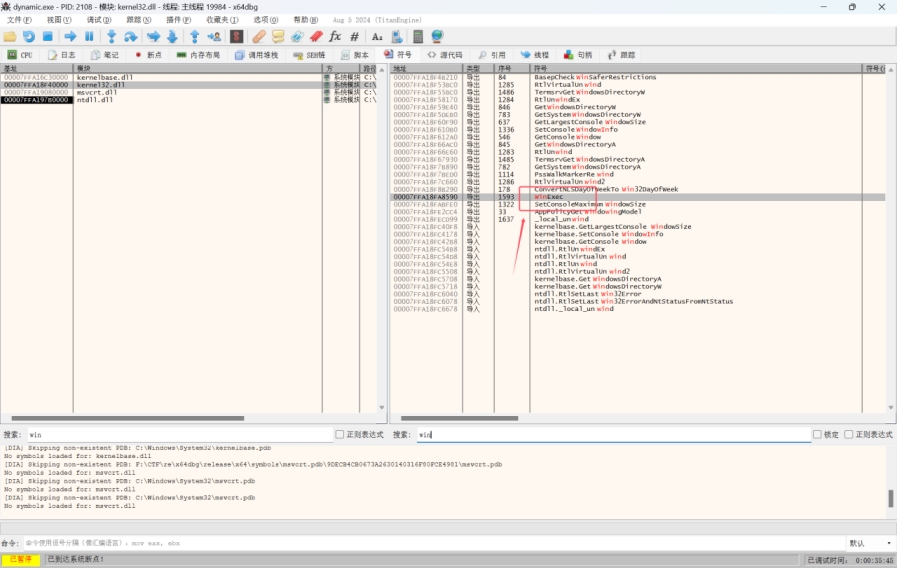
使用x64dbg定位到样本2执行“WinExec”代码
查看符号表,在kernel32.dll中寻找WinExec函数,下断点并运行。
3. 自动化分析
3.1 Cuckoo Sandbox安装
参考官网或者自己百度帖子,安装cuckoo sandbox。(请描述安装过程遇到哪些问题?如何解决的?)
参考:https://blog.csdn.net/Innocence_0/article/details/139017095
- 一开始安装依赖时python版本混乱,官网要求使用python2.7。
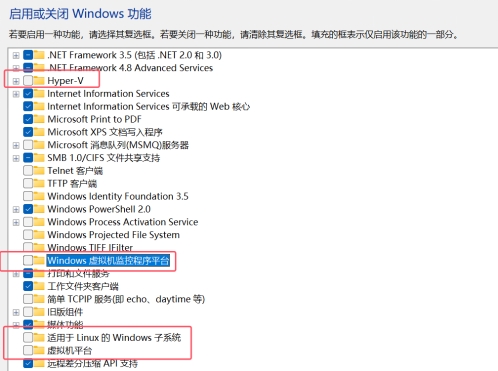
- 在实现VMware Workstation嵌套虚拟化时费了一些功夫,需要关闭一些windows功能选项,同时Win11还需要关闭VBS。
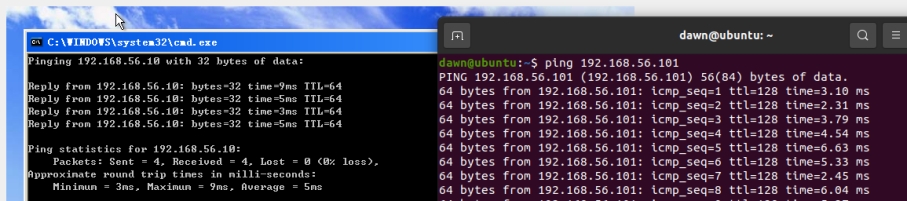
- Ping通网络,后面设置ip地址时host与client搞混了,停滞了一会儿。
由于python版本的限制,要求PIL对应python2.7,同时我的win虚拟机使用的是XP 32位,寻找对应资源花费了一些时间。
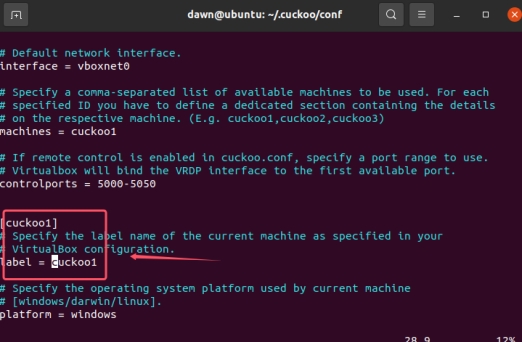
配置文件中的虚拟机名称没有及时更改,所以上传文件分析时并没有返回内容,一直为空,在这里停滞了一会儿。
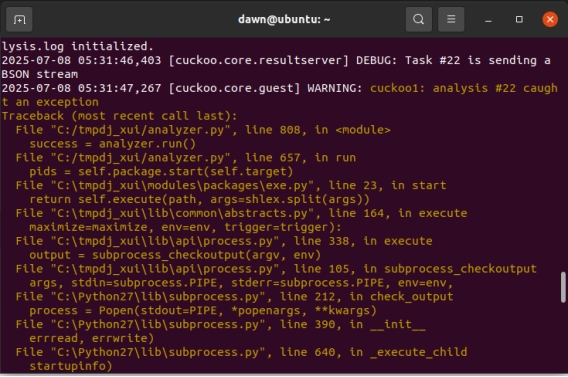
- 由于编译使用的是64位gcc,得到的exe文件无法在WindowsXP上运行,具体会如下报错:
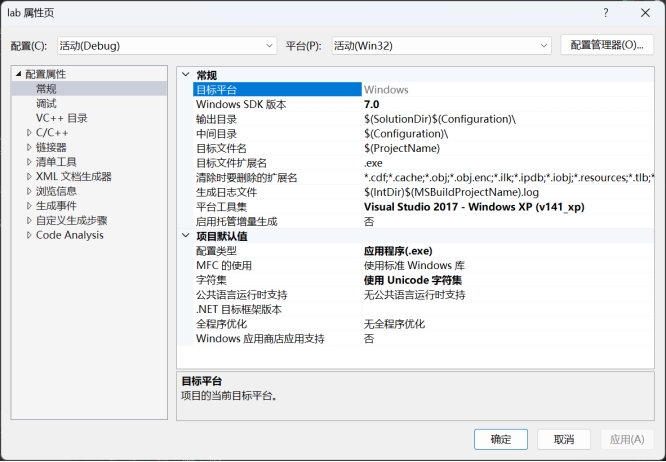
参照经验贴使用Visual Stdio编译(需更改一些设置项)
即可成功运行程序。
(针对这个问题,我尝试下载mingw32-gcc、更换主机全局gcc、调整代码、在XP中编译文件、在ubuntu中尝试交叉编译工具链,最后想要放弃XP改换为Win7,临镜像下载完成前发现这个方法 :p)
3.2 Cuckoo Sandbox使用
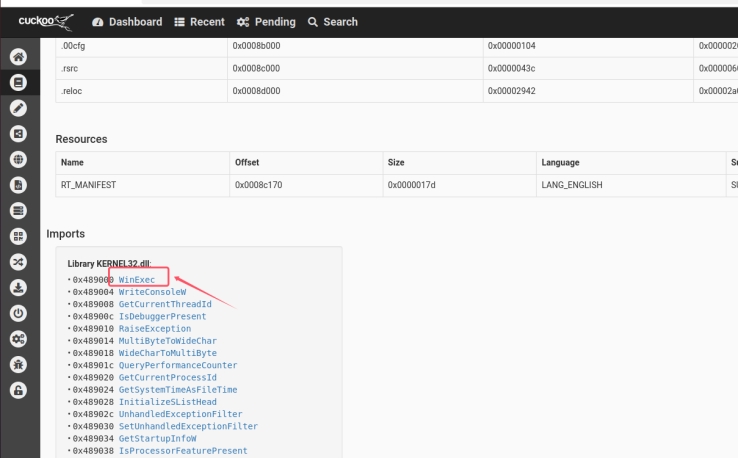
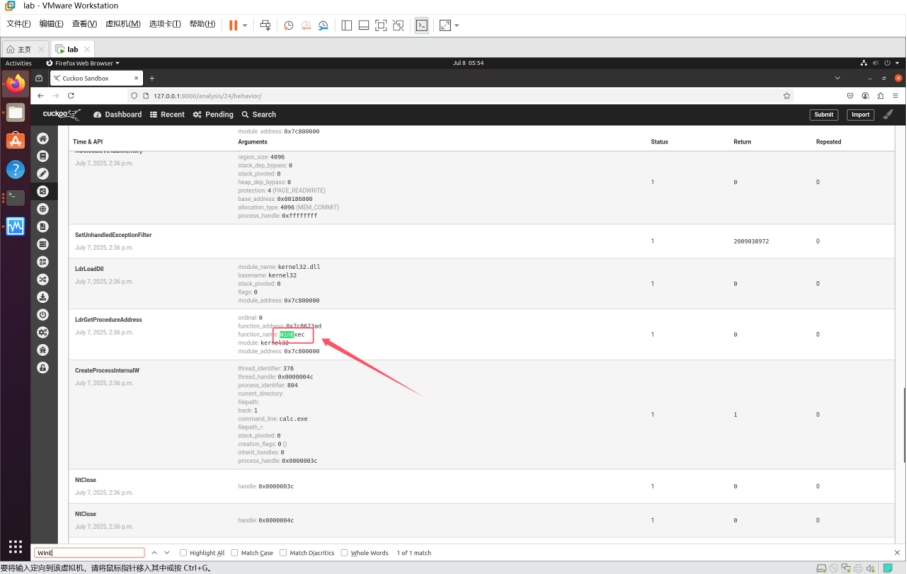
将样本1和2上传到安装好的cuckoo sandbox, 能否监控到“WinExec”的行为?
可以。Cuckoo Sandbox的核心机制是通过在客户机中注入监控模块对样本进行监控。当样本调用WinExec时,无论是通过静态导入方式调用WinExec(样本1),还是通过动态加载(样本2),只要cuckoo sandbox能正常对WinExec进行hook,Cuckoo都能成功捕捉并记录。
- 样本1:查看分析结果中的“imports”,发现WinExec。
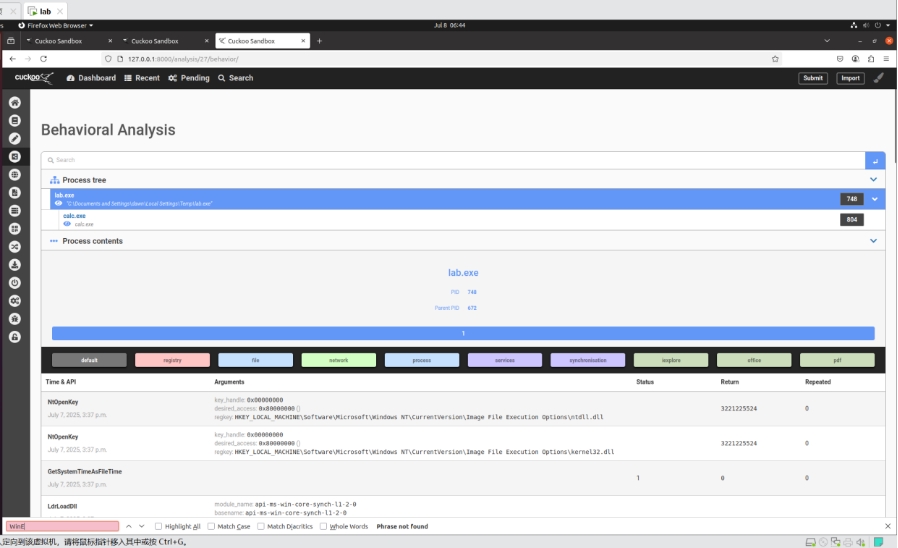
- 样本2:查看Behavioral Analysis,可以看到WinExec函数被调用,之后“calc.exe”也成功运行。
3.3 Cuckoo Sandbox原理
阅读cuckoo sandbox源码,以及网上搜索资料,解释cuckoo sandbox监控Windows API(如“WinExec”)的原理。
Cuckoo Sandbox能够监控Windows API调用的核心原理是:当程序调用WinExec时,会跳转到kernel32.dll中WinExec的真实地址执行。而Cuckoo使用hook技术修改函数开头的几个指令(插入跳转指令等操作),从而使程序先跳转到自定义的监控函数,然后跳转回原先函数继续执行。
主要分析的源代码:
https://github.com/cuckoosandbox/monitor/blob/master/src/hooking.c、
https://github.com/cuckoosandbox/monitor/blob/master/bin/monitor.c
- monitor.c文件(monitor_hook函数、monitor_unhook函数)
1
2
3
4
5
6
7
8
9
10
11
12
13
14
15
16
17
18
19
20
21
22
23
24
25
26
27
28
29
30
31
32
33
34
35
36
37
38
39
40
41
42
43
44
45
46
47
48
49
50
51
52
53
54
55
56
57
58
59
60
61
62
63
64
65
66
67
68
69
70
71
72
73
74
75
76
77
78
79
80
81
82
83
84
85
86
87
88
89
|
void monitor_hook(const char *library, void *module_handle)
{
for (hook_t *h = sig_hooks(); h->funcname != NULL; h++) {
if(library != NULL && stricmp(h->library, library) != 0) {
continue;
}
if(g_monitor_mode != HOOK_MODE_ALL &&
(g_monitor_mode & h->mode) == 0) {
continue;
}
while (hook(h, module_handle) == 1);
}
}
void monitor_unhook(const char *library, void *module_handle)
{
(void) library;
for (hook_t *h = sig_hooks(); h->funcname != NULL; h++) {
if(h->module_handle == module_handle) {
h->is_hooked = 0;
h->addr = NULL;
}
if(h->module_handle == NULL && range_is_readable(h->addr, 16) == 0) {
h->is_hooked = 0;
h->addr = NULL;
}
}
}
|
- Hooking.c文件(hook函数、hook_create_jump函数)
1
2
3
4
5
6
7
8
9
10
11
12
13
14
15
16
17
18
19
20
21
22
23
24
25
26
27
28
29
30
31
32
33
34
35
36
37
38
39
40
41
42
43
44
45
46
47
48
49
50
51
52
53
54
55
56
57
58
59
60
61
62
63
64
65
66
67
68
69
70
71
72
73
74
75
76
77
78
79
80
81
82
83
84
85
86
87
88
89
90
91
92
93
94
95
96
97
98
99
100
101
102
103
104
105
106
107
108
109
110
111
112
113
114
115
116
117
118
119
120
121
122
123
124
125
126
127
|
int hook(hook_t *h, void *module_handle){
if(h->addr == NULL) {
h->addr = (uint8_t *) GetProcAddress(h->module_handle, h->funcname);
if(h->addr == NULL) {
if((h->report & HOOK_PRUNE_RESOLVERR) != HOOK_PRUNE_RESOLVERR) {
pipe("DEBUG:Error resolving function %z!%z.",
h->library, h->funcname);
}
return -1;
}
}
h->func_stub = slab_getmem(&g_function_stubs);
memset(h->func_stub, 0xcc, slab_size(&g_function_stubs));
if(h->orig != NULL) {
*h->orig = (FARPROC) h->func_stub;
}
if(h->type == HOOK_TYPE_NORMAL) {
h->stub_used = hook_create_stub(h->func_stub,
h->addr, ASM_JUMP_32BIT_SIZE + h->skip);
}
else if(h->type == HOOK_TYPE_INSN) {
h->stub_used = hook_insn(h, h->insn_signature);
}
else if(h->type == HOOK_TYPE_GUARD) {
if(hook_hotpatch_guardpage(h) < 0) {
return -1;
}
}
uint8_t region_original[FUNCTIONSTUBSIZE];
memcpy(region_original, h->addr, h->stub_used);
if(hook_create_jump(h) < 0) {
return -1;
}
}
int hook_create_jump(hook_t *h)
{
uint8_t *addr = h->addr + h->skip;
const uint8_t *target = (const uint8_t *) h->handler;
int stub_used = h->stub_used - h->skip;
NTSTATUS status =
virtual_protect(addr, stub_used, PAGE_EXECUTE_READWRITE);
if(NT_SUCCESS(status) == FALSE) {
pipe("CRITICAL:Unable to change memory protection of %z!%z at "
"0x%X %d to RWX (error code 0x%x)!",
h->library, h->funcname, addr, stub_used, status);
return -1;
}
memset(addr, 0xcc, stub_used);
asm_jump_32bit(addr, target);
virtual_protect(addr, stub_used, PAGE_EXECUTE_READ);
return 0;
}
|
3.4 修改样本2,使其仍然能使用“WinExec”启动程序calc.exe, 并绕过cuckoo sandbox的监控。
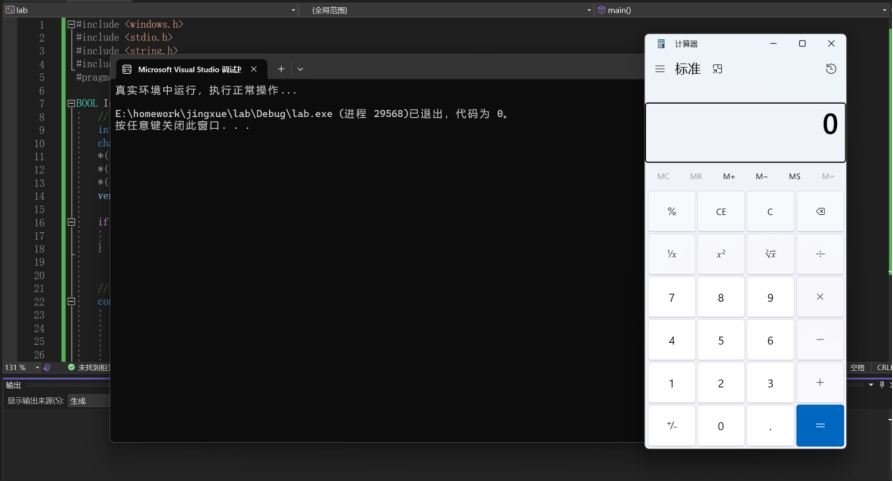
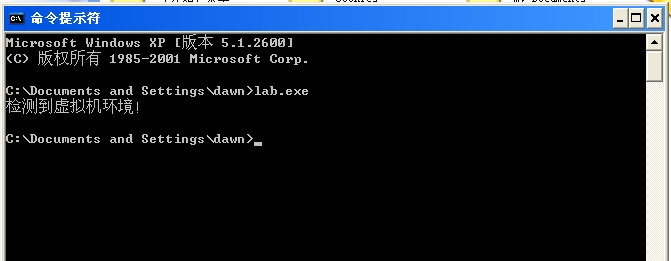
法1:如果说只是绕过cuckoo sandbox的监控,其实只需要绕过虚拟环境即可,因为cuckoo sandbox的监控过程建立在“被分析程序在虚拟环境中运行”的前提。
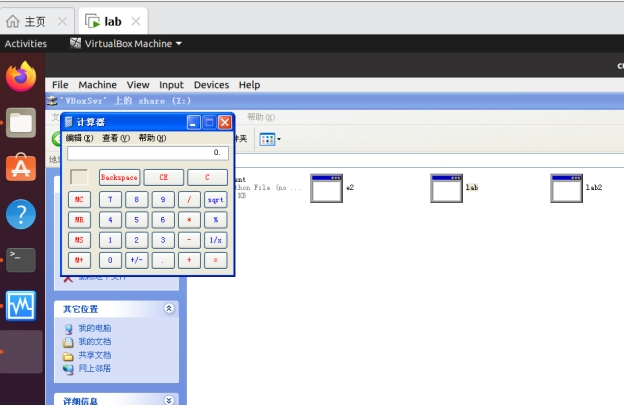
从下图可以看到,沙箱中的程序并没有调用calc.exe,说明成功检测到是虚拟环境停止运行,而在Windows主机中可以正常运行。
Win11主机:
XP虚拟机:
完整代码如下:
1
2
3
4
5
6
7
8
9
10
11
12
13
14
15
16
17
18
19
20
21
22
23
24
25
26
27
28
29
30
31
32
33
34
35
36
37
38
39
40
41
42
43
44
45
46
47
48
49
50
51
52
53
54
55
56
57
58
59
60
61
62
63
64
65
66
67
68
69
70
71
72
73
74
75
76
77
78
79
80
81
82
83
84
85
86
87
88
89
90
91
92
93
94
95
96
97
98
99
100
101
102
103
104
105
106
107
108
109
110
111
112
113
114
115
116
117
118
119
120
121
122
123
124
125
126
127
128
129
130
131
132
133
134
135
136
137
138
139
140
141
142
143
144
145
146
147
148
149
| \#include <windows.h>
\#include <stdio.h>
\#include <string.h>
\#include <psapi.h>
\#pragma comment(lib, "Psapi.lib")
BOOL IsVirtualMachine() {
// CPUID供应商检测
int cpuInfo[4] = { 0 };
char vendor[13] = { 0 };
*((int*)vendor) = cpuInfo[1]; // EBX
*((int*)(vendor + 4)) = cpuInfo[3]; // EDX
*((int*)(vendor + 8)) = cpuInfo[2]; // ECX
vendor[12] = '\0'; // 确保字符串结尾
if (strstr(vendor, "VMware") || strstr(vendor, "VBox")) { // 检测虚拟平台
return TRUE;
}
// 检测虚拟机进程
const char* sandboxProcesses[] = {
"vboxservice.exe", "vboxtray.exe",
"vmtoolsd.exe", "vmwaretray.exe",
"VBoxService.exe", "VBoxTray.exe",
"xenservice.exe", "qemu-ga.exe"
};
DWORD aProcesses[1024], cbNeeded, cProcesses; // 进程列表
if (EnumProcesses(aProcesses, sizeof(aProcesses), &cbNeeded)) {
cProcesses = cbNeeded / sizeof(DWORD); // 进程数
// 遍历所有进程
for (DWORD i = 0; i < cProcesses; i++) {
if (aProcesses[i] != 0) {
TCHAR szProcessName[MAX_PATH] = TEXT("<unknown>"); // 进程名
HANDLE hProcess = OpenProcess(
PROCESS_QUERY_INFORMATION | PROCESS_VM_READ,
FALSE,
aProcesses[i]
); // 打开进程
if (hProcess != NULL) {
HMODULE hMod;
DWORD cbNeededMod;
if (EnumProcessModules(hProcess, &hMod, sizeof(hMod), &cbNeededMod)) {
GetModuleBaseName(hProcess, hMod, szProcessName,
sizeof(szProcessName) / sizeof(TCHAR));
// 将进程名转换为小写然后进行比较
char lowerName[MAX_PATH];
for (int j = 0; szProcessName[j] && j < MAX_PATH; j++) {
lowerName[j] = tolower(szProcessName[j]);
}
lowerName[MAX_PATH - 1] = '\0';
// 检查是否有与虚拟化相关的进程
for (int j = 0; j < sizeof(sandboxProcesses) / sizeof(sandboxProcesses[0]); j++) {
if (strstr(lowerName, sandboxProcesses[j]) != NULL) {
CloseHandle(hProcess);
return TRUE;
}
}
}
CloseHandle(hProcess);
}
}
}
}
return FALSE;
}
int main() {
if (IsVirtualMachine()) {
printf("检测到虚拟机环境!\n");
return 0;
}
printf("真实环境中运行,执行正常操作...\n");
WinExec("calc.exe", SW_SHOWNORMAL);
return 0;
}
|
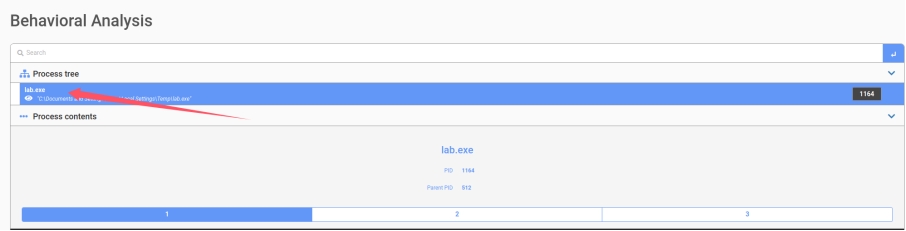
法2:通过查找资料,了解到WinExec函数在WinXP中的地址是固定的,所以我们可以绕过GetProcAddress直接通过函数地址来调用WinExec,而不需要使用API。结果如下图,在进程树中没有找到WinExec函数。(但这个方法很有限,不具有普适性)
1
2
3
4
5
6
7
8
9
10
11
12
13
14
15
16
17
18
19
| #include <windows.h>
#include <stdio.h>
#include <stdlib.h>
typedef UINT(WINAPI* WinExec_t)(LPCSTR lpCmdLine, UINT uCmdShow);
int main() {
// 通过固定地址获取WinExec函数地址
WinExec_t pWinExec = (WinExec_t)(0x7c8623ad);
pWinExec("calc.exe", SW_SHOWNORMAL);
return 0;
}
|
3.5 如何监控“WinExec”,比cuckoo sandbox的监控方式更难绕过?
要比cuckoo sandbox的监控方式更难绕过,就不能只依赖API Hook。
通过调用内核API注册回调函数,当系统创建或结束进程时,该函数会自动被调用,这样就能捕获到所有进程的行为,因此比cuckoo sandbox更难绕过。
系统调用钩子在调用链更底层,也能监控所有进程创建途径。
ETW是官方提供的系统级事件追踪,允许程序在不修改的情况下知晓系统事件。
使用虚拟化监控(如基于Hypervisor的VMI)能从硬件层面监视系统调用,几乎无法被绕过,但复杂度和资源消耗较高。
(三)恶意代码分析
1. 人工分析
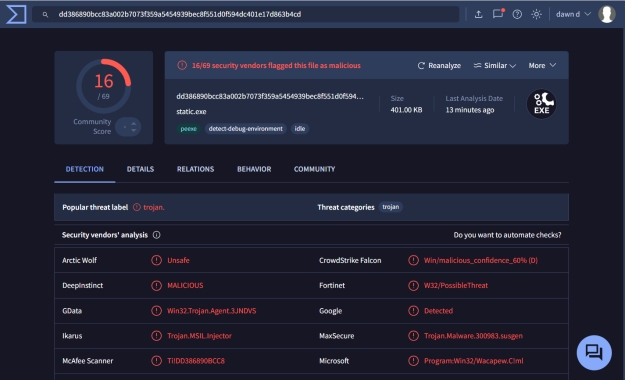
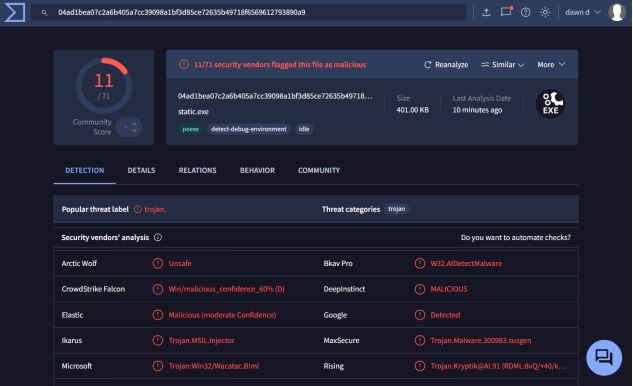
将样本1和样本2上传到VirusTotal。对于样本1和样本2,VirusTotal分别有几个安全软件报警?请思考,并解释为什么样本1和样本2的检测结果不同?
样本1:
样本2:
原因:
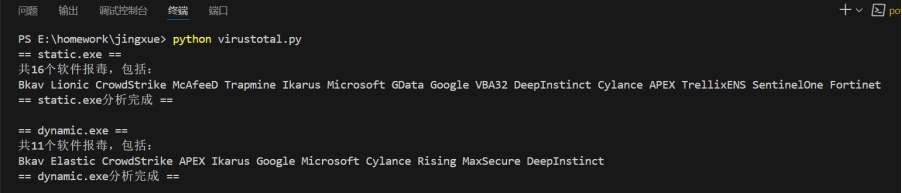
样本1有16个软件报毒,样本2有10个软件报毒。样本1是静态导入,导入表中出现WinExec函数,更明显、更容易检测出来,所以个数更多;样本2是动态载入导入表中不直接出现WinExec函数,会在程序运行时才获取函数地址,因此只有动态分析这类方法才能检测到,个数更少。
2. 自动化分析
参考7\8, 以及自己查找的资料,使用Python程序调用VirusTotal的API, 自动化上传样本1和样本2到VirusTotal检测,并自动换接收检测结果(每个样本有几个安全软件报警?)
主要过程包括上传文件和获取报告。首先上传待分析文件获取对应的id和分析报告url,访问该url获取分析报告,然后进行结果分析。结果分析的代码主要是对response进行处理,其中的res[“data”][“attributes”][“stats”][‘malicious’]字段记录了报毒软件数目,之后通过每个软件字段中的category字段判断当前安全软件是否对该文件报毒。
完整代码如下:
1
2
3
4
5
6
7
8
9
10
11
12
13
14
15
16
17
18
19
20
21
22
23
24
25
26
27
28
29
30
31
32
33
34
35
36
37
38
39
40
41
42
43
44
45
46
47
48
49
50
51
52
53
54
55
56
57
58
59
60
61
62
63
64
65
66
67
68
69
70
71
72
73
74
75
76
77
78
79
80
81
82
83
84
85
86
87
88
89
90
91
92
93
94
95
| import requests
import time
\# 上传文件
def upload_file(filepath, url, headers):
files = { "file": ("static.exe", open(filepath, "rb"), "application/x-msdownload") }
response = requests.post(url, files=files, headers=headers)
\# print(response.text)
id = None
if response.status_code == 200:
id = response.json()["data"]["id"] # 文件id
url_analysis = response.json()["data"]["links"]["self"] # 获取报告的url
return id, url_analysis
\# 获取分析报告
def get_report(url, headers):
while(True):
response = requests.get(url, headers=headers)
if response.status_code != 200:
print(response.text)
return None
\# print(response.text)
res = response.json()
status = res["data"]["attributes"]["status"]
if status == "completed":
print(f"共{res["data"]["attributes"]["stats"]['malicious']}个软件报毒,包括:")
results = res["data"]["attributes"]["results"]
for software, result in results.items():
if result["category"] == "malicious": # 筛选
print(f"{software}", end=" ")
return
else:
time.sleep(20) # 等待分析
url = "https://www.virustotal.com/api/v3/files"
api = "92222ce68fd4054dfa1d941aa8133126c079f9841a3b76c4e2be04007e27a849" # 注册账号获取api
headers = {
"accept": "application/json",
"x-apikey": api
}
files = ["static.exe", "dynamic.exe"] # 要分析的文件
for file in files:
print(f"== {file} ==")
id, url_analysis = upload_file(file, url, headers)
if id:
get_report(url_analysis, headers)
print(f"\n== {file}分析完成 ==\n")
else:
print("id获取错误\n")
|
三.实验总结
通过本次实验,我深入理解了恶意代码分析的基本方法。
通过构造两个样本,分别使用静态导入与动态调用的方式执行WinExec,我学会了借助IDA和pefile工具进行静态结构分析。
利用x64dbg和Cuckoo Sandbox对样本行为进行动态监控,理解了Cuckoo Sandbox的检测原理,还分析了源码。
使用VirusTotal接口实现样本自动化上传与检测,探究了安全软件对静态与动态两种方式检测的不同程度的可能原因。
除此之外,我在环境搭建过程中学会了很多环境配置方法,对于linux的操作更加熟悉。